In mobile application development, first impressions are measured in milliseconds.
Users expect apps to open instantly. A delay of even two seconds can increase abandonment rates significantly. Startup performance is no longer just a technical metric—it is a business KPI tied to retention, engagement, and revenue.
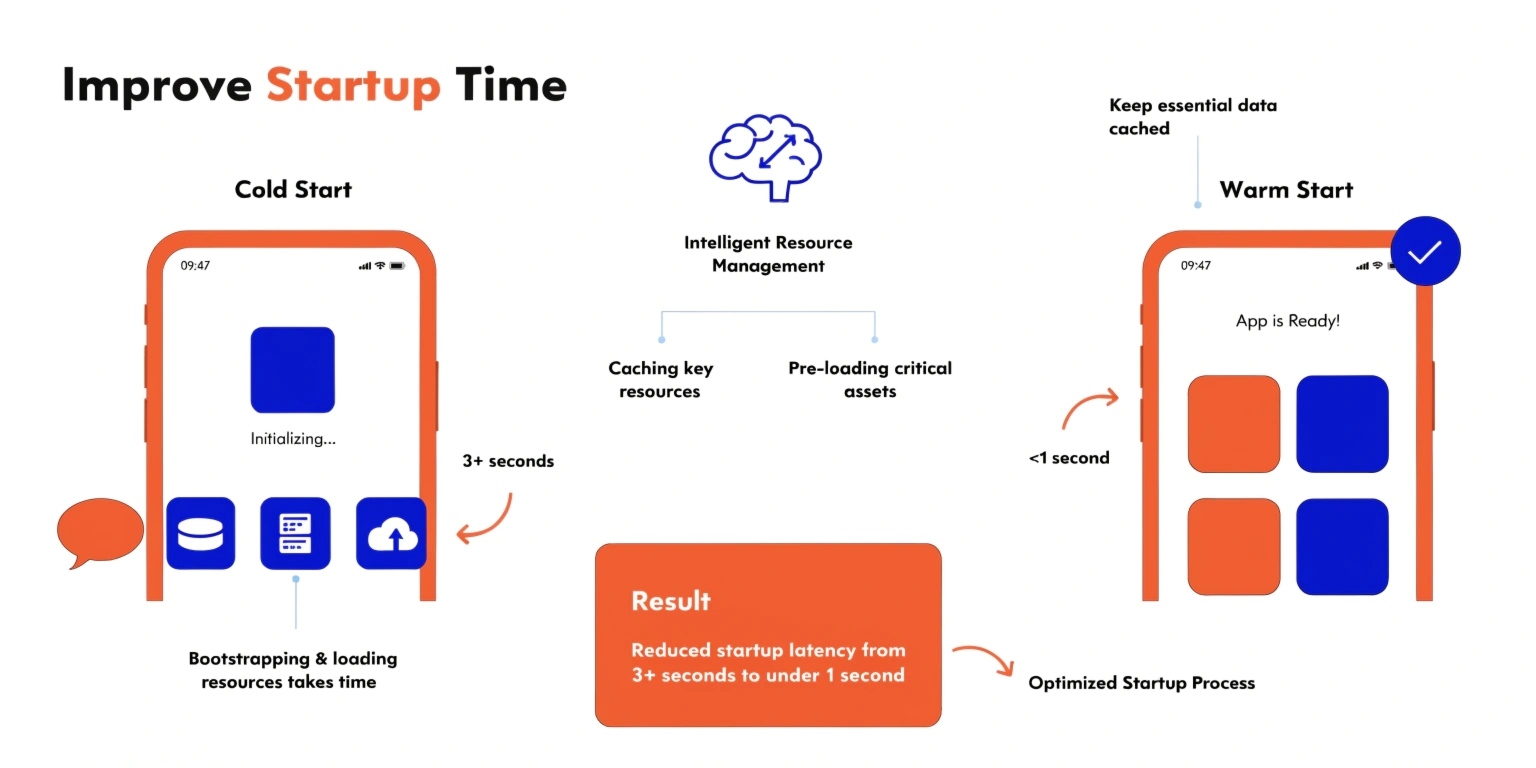
To optimize startup time effectively, developers must first understand the difference between cold start and warm start.
Understanding Cold Start vs Warm Start
On platforms like Android and iOS, app launches are categorized into three types:
1. Cold Start
Occurs when:
- The app process is not in memory.
- The system must create a new process.
- Application class is initialized.
- Dependencies are loaded.
- UI is rendered for the first time.
This is the slowest and most expensive startup scenario.
2. Warm Start
Occurs when:
- The app process is in memory.
- Activity or view controller must be recreated.
- Some state restoration is required.
Faster than cold start, but still involves UI reinitialization.
3. Hot Start
Occurs when:
- The app is already running in the foreground or background.
- Minimal setup is required.
Optimization efforts primarily focus on cold start, since it has the highest performance cost.
Why Startup Time Matters
Startup performance directly influences:
- App store ratings
- User retention
- Conversion rates
- Perceived brand quality
Research shows that users form reliability judgments based on launch speed. A slow startup signals instability—even if the app performs well afterward.
What Happens During Cold Start?
On Android, the sequence includes:
- Zygote process fork
- Application object creation
- Dependency injection initialization
- Content provider setup
- Main thread UI inflation
- First frame rendering
Each step adds latency. Poorly structured initialization compounds delays.
Advanced Strategies to Improve Cold Start
1. Minimize Work in Application Class
Avoid heavy operations inside the Application lifecycle.
Common mistakes:
- Initializing analytics SDKs synchronously
- Loading large configuration files
- Database warmups
- Network calls
Use deferred initialization instead.
2. Implement Lazy Initialization
Load only what is necessary for the first screen.
Non-critical components should initialize:
- After first render
- In background threads
- On-demand when accessed
This reduces main-thread blocking.
3. Optimize Dependency Injection
Large dependency graphs increase startup latency.
If using dependency injection frameworks:
- Avoid eager singletons
- Split modules by feature
- Initialize heavy services lazily
Dependency injection should not delay first frame rendering.
4. Reduce Main Thread Blocking
Startup time is often limited by work performed on the UI thread.
Best practices:
- Offload disk I/O to background threads
- Avoid synchronous database queries
- Defer logging frameworks
- Eliminate unnecessary reflection
Measure main thread time using profiling tools rather than guessing.
5. Optimize Layout Inflation
Complex layouts slow down rendering.
Improve UI startup by:
- Reducing nested view hierarchies
- Avoiding deep layout nesting
- Using constraint-based layouts efficiently
- Minimizing overdraw
The faster the first frame appears, the better the perceived performance.
6. Use Splash Screens Strategically
Splash screens do not improve performance—but they improve perceived performance.
Use them to:
- Mask background initialization
- Load lightweight branding assets
- Prepare asynchronous tasks
However, avoid long artificial delays. Users detect fake loading.
7. Profile Before Optimizing
Optimization without measurement is guesswork.
Use tools such as:
- Android Studio Profiler
- Xcode Instruments
- Startup tracing tools
- Frame rendering analysis
Measure:
- Time to first frame
- Time to interactive
- CPU usage during startup
- Memory allocation spikes
Data-driven optimization prevents wasted effort.
Warm Start Optimization
While cold start is priority, warm start also requires tuning.
Common issues include:
- Expensive state restoration
- Heavy fragment recreation
- Unnecessary data reloads
Improve warm start by:
- Caching lightweight state
- Avoiding redundant network calls
- Persisting minimal UI data
- Implementing efficient lifecycle management
Warm start optimization ensures smooth app switching experiences.
Code Shrinking and Binary Optimization
Large app size increases startup cost.
Techniques include:
- Removing unused resources
- Enabling code shrinking tools
- Eliminating unused dependencies
- Reducing dynamic feature loading at launch
Smaller binaries load faster.
Architectural Considerations
Modern mobile architecture patterns (MVVM, Clean Architecture) can either help or hurt startup performance depending on implementation.
Good design principles include:
- Clear separation of responsibilities
- Avoiding initialization cascades
- Feature-based modularization
- Independent module loading
Architecture must support performance—not just maintainability.
The Business Impact of Milliseconds
Improving startup time by even 500 milliseconds can:
- Increase session length
- Improve store ratings
- Reduce uninstall rates
- Enhance user trust
In competitive markets, performance is differentiation.
Final Thoughts
Optimizing app startup time is not about micro-optimizations—it is about architectural discipline.
Cold start should focus on:
- Minimal critical-path execution
- Deferred initialization
- Efficient rendering
Warm start should focus on:
- Intelligent state management
- Lifecycle efficiency
Fast startup is not a feature.
It is a user expectation.
In mobile engineering, speed equals credibility.